Showing posts with label workflow. Show all posts

Wednesday, September 21, 2011

Designing and Creating Workflows with Visio 2010

One of the biggest challenges in implementing a successful workflow is not becoming an expert in coding/creating a custom workflow but to design it as per the requirement of user or business needs. Typically, a consultant would talk to business users, understand business process and then design the workflow. This design is then handed over to SharePoint professionals to implement on SharePoint.

Visio makes the task of analyzing the requirement and actually putting it down on paper. We can draw diagrams, create flowcharts for workflows and the best part is that now, we can export the workflow in .vwi format (Visio Workflow Interchange) and then import it in SharePoint Designer 2010. Thus, a consultant or a business power user can create Visio diagrams for the workflow and SharePoint professionals can easily import them in SharePoint Designer 2010 and implement it on lists/sites.

Creating a workflow using Visio 2010:
Visio 2010 provides us with specific workflow templates that can be directly imported in SharePoint Designer 2010.


When we select “SharePoint Workflow” template in Visio, we can see that there is a set of shapes available. These shapes relate to the actions and conditions in SharePoint Designer 2010.


Use this template and create a workflow diagram as per your business requirement. Once the diagram is done, Click on “Export the diagram” from “Process” tab in Visio. This will check the file for any errors and export the file and save it as a .vwi format file.


Importing the workflow diagram in SharePoint Designer 2010:
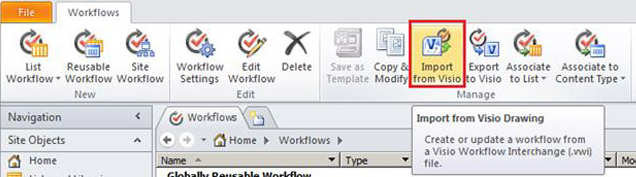
Open SharePoint Designer 2010 and open the site/list where you would like to associate the workflow. Under the workflow tab, you can see the button for Importing the workflow from a Visio document.


Once the workflow is imported, it can be further customized or details can be added. You can then publish the workflow on the required list/site.

Friday, April 16, 2010

What SharePoint Administrators should know about .NET Framework? (Part 2)

Find Part 1 of this series here:
Part 1 - http://sharepoint-talk.blogspot.com/2010/04/what-sharepoint-administrators-should.html

(..... continued)
4) ASP.NET
.NET as a framework provides us with ASP.NET, a technology that is used for development of web based pages/sites. Now many of us get confused with .NET framework and ASP.NET. Some treat them as one single component/technology. But that is far away from reality. ASP.NET is a server side technology that again uses .NET framework. .NET framework code base can be used to create desktop or web based application. ASP.NET is the technology (built upon) .NET framework that helps us create web based applications using Visual Studio.
Now that we can differentiate between ASP.NET and .NET framework, we need to relate ASP.NET with SharePoint. But before relating it to SharePoint, we need to understand the relation of ASP.NET and IIS. ASP.NET is registered with IIS. So when a page request (for .aspx files) come to IIS, IIS knows that this request needs to be handled by ASP.NET. IIS authenticates the request first (this is when you get the username and password prompt and that is actually generated by IIS). Once the user is authenticated, IIS then passes the request onto the ASP.NET filter (aspnet_isapi.dll). The request is usually for a .aspx page. ASP.NET then reaches out for the page and processes the request with the help of .NET framework code base and CLR.
ASP.NET can be registered/Unregistered with IIS. When it is registered, we can check that out from IIS Manager -> Web Server Extensions. In this window, we will see the ASP.NET and it's version.
If ASP.NET is not registered properly, you now know that the web pages will not be rendered. IIS does not know where to pass the request and how to process it.

5) Web Services
A Web Service is actually a component sitting on the server. A call can be made to the web service from local or remote server. Mostly a web service is developed so that remote clients (which cannot be installed or are run on remote machines) and application need to use the functionality.
e.g. Office Clients use web services for getting meta-data (list.asmx), get workflow status, etc. So a Office application makes call(s) to the web service(s) located on the server. On the server, the web service is responsible for executing the code and return the result set back to the application from where the call was generated. The data transfer is usually done in XML (Extensible Markup Language).
If you want to check out the data that is being transferred between the client and the web service, take a network monitor trace and analyze the response that we get from the server. Also take a look at the .asmx (web service) that is being called. This way we can learn more about the web services and where they are used.

6) Windows Workflow Foundation
Workflows are used heavily in SharePoint. And Workflows need no introduction who have been working with SharePoint and administering it. But how do the workflow work and what is Windows Workflow Foundation.
Workflows that are executed on the Server is again something that .NET does. Also, Windows Workflow Foundation can be installed on Client Operating Systems like XP, Vista, Seven, etc. When a client open a document in Office and tries to make changes to the Workflow, the local Windows Workflow Engine starts to work. It can then communicate back to the server. Also, when SharePoint renders pages that are related to workflows, WWF runs on the server and executes to show up the results.
e.g. In a publishing site, if content approval is enabled for items in the "Pages" library, a workflow is started on the items (pages) that are created and eventually when the page is published the workflow is finished. This type of workflow is executed on the server. Well, frankly speaking, most of the workflows that are present in SharePoint are run on the server. There are timer jobs for Workflows that are run at specific intervals. These timer jobs communicate with the WWF/.NET for executing the activities present in the workflow.
We can look at WWF as a technology that standardizes workflow related activities across different machines. This technology provides various logic for the users/admins to create workflows that can be deployed and executed on SharePoint Servers. A workflow thus can be termed as a set of activities which run as per the business logic applied.
When a workflow fails, exceptions are usually trapped in the ULS logs (NOTE: We need to ensure that we are enabling logging for the workflow events from Central Admin site). You will find that the exception is raised from a class/assembly file, which is part of the .NET framework (System.Workflow class). Thus, we can find out which component within that Workflow class is failing and figure out what can be the possible issue.

You might find these articles useful